PRESENTED BY

If you’re really busy, it’s easy to miss news and updates that matter. Well, this is your moment to get up to speed because your favorite ride-hailing and lifestyle services savior Grab has revamped its current app into a multi-purpose everyday super app.
If you already have Grab on your phone, great. Just make sure it’s updated because we’re giving you a quick rundown on its glossy new features that’ll do you wonders. (We’ll wait patiently for 2 minutes till your update is complete.)
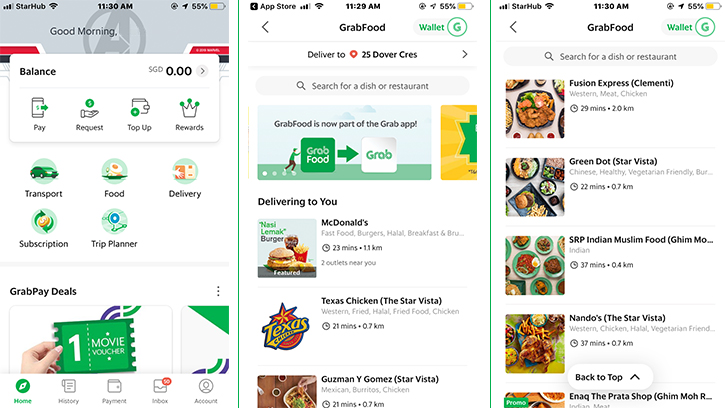
And – there you go! As of 2 May, GrabFood and its services have found a new home in the main Grab app.
Known as GrabFood BETA during this initial phase, it ensures that you can now make a food delivery order on the same super app that you use to book your rides and redeem your GrabReward points. (We all know how pesky it is to have too many apps on your phone.)
Read on to discover what you can enjoy with this engaging new app experience, which is set to bring greater convenience to the lives of Grab users.
Photo
Redeeming rewards has never been more seamless
If you’ve subscribed to any of Grab’s food and transport plans, you don’t need to toggle between two apps to activate your food promos and rewards anymore. With this integration, everything is housed together, removing the need to copy and paste your codes from one app to another.
Tip: Browse through the different subscription plans available in the app to earn a whole lot of savings if you’re a frequent Grab user!
Whether it’s ordering it right or righting your orders – GrabChat is the way to go
Got a special request for extra napkins, or perhaps keyed in your block number wrongly? With the GrabChat feature, you can simply drop your delivery rider a note after your order has been confirmed. Simply tap on the chat icon to send a message – gone are the days of using your personal mobile number (and it’s free!).
Tip: A thoughtful ‘Thank you’ text goes a long way. Why not show your appreciation for the delivery riders working hard out there to bring your food to you?
Paying for your meal only necessitates a few taps
Forget about fumbling for cash or hunting down small change at home. With GrabFood BETA, you can pay for your food using the same method that you use for your rides.
Tip: The app currently does not allow cash payments, so be sure to key in your card details or top up your GrabPay credits beforehand. It only takes a few seconds!
Keeping track of your expenses is easier with your numbers consolidated under one roof
Just how much do you typically spend on Grab ride bookings and GrabFood orders? If you’re the financially responsible sort who tracks your expenses regularly, then GrabFood BETA is set to make your task a whole lot easier. Your GrabFood order history is now accessible under the ‘History’ tab, along with all your ride transactions.
Tip: Access ‘History’ at the bottom left section of your screen, next to ‘Home’ on the app.
Of course, it’s not called ‘BETA’ for nothing. More conveniences are in the works, so hang tight for them. According to Grab, we can look forward to more features in the months to come, such as advanced food orders and concurrent bookings.
So experience GrabFood BETA for yourself – you’ll love it just as we do! Now, speaking of food, we’re getting hungry and we know exactly what to do without even getting up from our seat.